GST Portal Multi-State Registration 2026: Master TRN Guide
Last updated: 2 October 2026. This article covers the Multi-State Registration option that went live on the GST Common Portal on 1 October 2026, along with the related auto-population facility introduced by GSTN on 10 September 2026.
Opening a branch, warehouse or office in a new state has always meant one thing for GST: a fresh registration, started from scratch. If your business needed GSTINs in four states, you filled Part A of FORM GST REG-01 four times, verified four sets of OTPs and tracked four unrelated TRNs.
The GST Portal has now changed that. A new GST multi-state registration option lets you select several States or Union Territories in one go, verify once and receive a single Master TRN. The portal then splits it into a separate TRN for each state you selected. This guide explains exactly what has changed, what has not, how to apply step by step, and what to keep in mind after your GSTINs are issued.
Key takeaways
- A new Multi-State Registration option on the GST Common Portal lets you start registration applications for multiple States/UTs through one common flow.
- You get one Master TRN. After submitting it, the portal generates a state-specific TRN for every state you picked.
- Common details (legal name, PAN, email, mobile) are entered once and carried into each state application.
- There is still no single all-India GSTIN. Every state gets its own GSTIN, returns and compliance.
- Separately, from 10 September 2026, an applicant with an active GSTIN can auto-populate a new REG-01 from that existing registration under the same PAN, with OTP consent from its Primary Authorised Signatory.
In this article
- What is new on the GST Portal
- Master TRN vs state-specific TRN
- Do you get one GSTIN for all states?
- How to apply: step-by-step process
- Old process vs new process
- Related update: auto-populate from an existing GSTIN
- Documents required
- Who should use this facility
- Common mistakes to avoid
- Compliance after multi-state registration
- FAQs
What is new on the GST Portal in October 2026?
From 1 October 2026, the GST Common Portal shows a separate Multi-State Registration option alongside the regular new-registration route. Instead of choosing a single state at the start of FORM GST REG-01, you can now choose several States or Union Territories from a multi-select list.
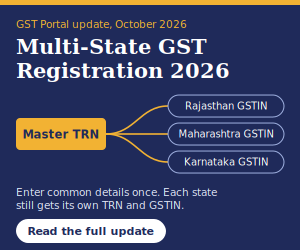
You enter your common business identity once: the legal name as per PAN (and as per MCA records where applicable), the PAN itself, email address and mobile number. After OTP verification, the portal issues one Master TRN covering all the selected jurisdictions. When you submit that Master TRN, the portal generates an individual TRN for each state, and the common profile you entered flows into each of those state applications automatically.
In simple terms, the update removes the repetitive opening steps of a multi-state rollout. The legal requirement to register separately in each state has not changed. The way you start those applications has.
Note: At present, the facility is displayed for Normal Taxpayers, and the portal allows only one registration per State/UT under one Master TRN. Detailed eligibility conditions should be checked against official GSTN or CBIC advisories as they are published.
Master TRN vs state-specific TRN: what is the difference?
A TRN (Temporary Reference Number) is the reference the GST Portal issues after Part A of a registration application is verified. You use it to log back in, complete Part B and upload documents.
Under the new flow there are two layers of TRN:
- Master TRN: a single common reference generated for all the States/UTs you selected in the multi-state flow. It represents the shared starting point, not a registration.
- State-specific TRN: generated for each selected state after the Master TRN is submitted. You complete that state’s Part B (principal place of business, additional places, goods and services, bank account, authorised signatory, documents) using this TRN.
The Master TRN does not replace the state applications. Each state application still has to be completed, verified and approved on its own merit by the respective jurisdictional officer.
Do you get one GSTIN for all states?
No. This is the single most important point to understand about the update. GST in India remains a destination-based tax administered state by state, and registration continues to be state-specific. The formula stays the same:
One PAN + registrations in multiple states = multiple GSTINs
For example, a Jaipur-based company expanding into Maharashtra and Karnataka can select Rajasthan, Maharashtra and Karnataka together in the multi-state flow and receive one Master TRN. Once each state application is approved, the company will hold three separate GSTINs, each with its own returns, ledgers and compliance calendar.
How to apply for GST registration in multiple states: step-by-step
Here is the new process as it currently appears on the portal:
- Open the GST Common Portal at www.gst.gov.in and go to Services > Registration. Choose the Multi-State Registration option, which appears separately from the regular “New Registration” option.
- Enter the common details: legal name of the business as per PAN, PAN, email address and mobile number of the Primary Authorised Signatory.
- Select the States/UTs where you need registration from the multi-select list. Pick only the states where you have a genuine registration requirement.
- Verify the OTPs sent to the email and mobile number you entered.
- Note down the Master TRN generated on screen and sent to your email and mobile.
- Submit the Master TRN. The portal then generates a separate state-specific TRN for every state you selected.
- Complete Part B for each state using its own TRN: business details, principal place of business in that state, additional places, goods/services (HSN/SAC), bank account, authorised signatory and documents.
- Complete authentication (Aadhaar OTP or biometric authentication, as the portal requires for your case) and submit each application with DSC or EVC to receive an ARN.
- Track each ARN separately and respond to any clarification notice (FORM GST REG-03) for that state within the time allowed.
Watch the draft validity. Under the standard registration process, a TRN application that is not submitted within 15 days is purged and you have to start again. Confirm the validity period that applies to the Master TRN and each state TRN on the portal, and plan your document collection so that every state application is ready before you start.
Old process vs new Multi-State process
| Aspect | Earlier process | New Multi-State process |
|---|---|---|
| Starting the applications | One Part A per state | One common flow with all states selected |
| OTP verification | Repeated for each state | Once for the common flow |
| Reference number | Unrelated TRN for each application | One Master TRN, then linked state-specific TRNs |
| Common profile details | Typed again every time | Entered once, carried into each state application |
| GSTIN issued | One per state | One per state (no change) |
| Documents and verification | Per state | Still per state |
| Approval | By each state’s jurisdictional officer | By each state’s jurisdictional officer (no change) |
Related update: auto-populate details from an existing GSTIN (September 2026)
The multi-state option is the second registration upgrade in a month. On 10 September 2026, GSTN introduced an auto-population facility in FORM GST REG-01 for businesses that already hold an active GSTIN and want another registration under the same PAN, whether in the same state or a different one.
Here is how it works:
- While filling Part B of FORM GST REG-01, select “Yes – Auto-Populate Details”.
- The Primary Authorised Signatory of the existing GSTIN gives consent through OTP verification.
- After successful verification, eligible details already held in the GST system are filled into the new application.
- The auto-filled fields are not locked. Review them, edit wherever needed and click Save & Continue.
Two cautions apply. First, auto-population is a data-entry shortcut, not a grant of registration; the application is still examined normally. Second, details copied from your home-state registration (for example, place-of-business address, nature of business or bank account) may not be correct for the new state. Check every auto-filled field before you submit.
Which route should you use? If you are a new business or are registering in several states at once, the Multi-State Registration flow is designed for you. If you already hold a GSTIN and are adding one more state, the auto-population option inside the regular REG-01 may be quicker. Either way, the end result is a separate GSTIN for each state.
Documents required for multi-state GST registration
The common flow only asks for PAN, legal name, email, mobile and the list of states. Each state application, however, still needs its own documents. Keep these ready for every state before you begin:
- Constitution proof: certificate of incorporation, partnership deed or LLP agreement, as applicable.
- PAN and Aadhaar of the proprietor, partners, directors or promoters, along with photographs.
- Proof of principal place of business in that state: electricity bill, property tax receipt or ownership document; for rented premises, the rent or lease agreement plus a consent letter or NOC from the owner.
- Proof for additional places of business in the same state, such as warehouses or godowns.
- Bank account proof: cancelled cheque, passbook first page or bank statement.
- Authorisation: board resolution or letter of authorisation for the authorised signatory, with photograph.
- Digital Signature Certificate (DSC), mandatory for companies and LLPs.
Exact requirements vary by constitution of business and by state, so always go by the checklist shown on the portal for each application.
Who should use the multi-state registration facility?
The facility is most useful for businesses that need GSTINs in several states at around the same time, such as:
- Startups and new companies launching operations in more than one state from day one.
- Manufacturers and distributors setting up depots, plants or warehouses in other states.
- Retail and hospitality chains opening outlets or properties across state borders.
- E-commerce sellers storing stock in fulfilment centres located outside their home state.
- Service companies opening branch offices that will supply services from those states.
Remember that having customers in another state does not, by itself, require registration there. Registration is generally needed in a state from which you make taxable supplies, for example where you have a fixed place of business, branch or warehouse. Interstate sales from your home state are usually billed with IGST under your existing GSTIN.
Common mistakes to avoid
- Selecting states “just in case”. Every GSTIN carries monthly or quarterly return obligations, even with nil activity. Register only where there is a real requirement.
- Name mismatch with PAN. The legal name must match the PAN database exactly, or validation will fail for every state.
- Treating the Master TRN as approval. A TRN, master or state-specific, is only a draft reference. Registration exists only once a GSTIN is allotted.
- Reusing home-state documents. Address proof and rent agreements must relate to the premises in that particular state.
- Letting drafts expire. Collect documents for all states first, then start the flow, so no state application lapses.
- Ignoring clarification notices. A query raised in one state does not show up in the others. Monitor every ARN individually.
GST compliance after multi-state registration
The new facility makes registration faster, but compliance after registration remains state by state. Once your GSTINs are issued, plan for the following:
- Separate returns for every GSTIN: GSTR-1, GSTR-3B and, where applicable, the annual return GSTR-9 and reconciliation statement GSTR-9C.
- Separate books and invoice series for each GSTIN, with the correct state code on every invoice.
- Inter-branch transactions are supplies. Stock transfers and services between your own GSTINs in different states are generally treated as taxable supplies between distinct persons and need proper invoicing and valuation.
- Input Service Distributor (ISD): businesses with multi-state GSTINs that distribute common input tax credit on services among branches are required to register as an ISD, a requirement effective from 1 April 2025.
- E-invoicing and e-way bills apply on the basis of your aggregate turnover across all GSTINs under the same PAN, so a new state GSTIN may need e-invoicing from its very first invoice.
- Accounting software setup: create a separate company or GST registration ledger for each GSTIN in Tally, Zoho or your ERP so returns can be generated cleanly.
Frequently asked questions
What is Multi-State Registration on the GST Portal?
It is a new GST Portal facility, visible from 1 October 2026, that lets you start GST registration applications for several States or Union Territories through one common flow and one Master TRN.
What is a Master TRN in GST?
A Master TRN is the common Temporary Reference Number generated for all the States/UTs selected in the multi-state flow. Submitting it creates a separate TRN for each selected state.
Will I get a single GSTIN for all states?
No. GST registration remains state-specific. You receive a separate GSTIN for each state once that state’s application is approved.
Who can use the Multi-State Registration facility right now?
The facility is currently shown for Normal Taxpayers. Check official GSTN or CBIC advisories for any further eligibility conditions.
Can I apply for two registrations in the same state under one Master TRN?
No. The portal currently allows only one registration per State/UT under a single Master TRN. For an additional registration in the same state, use a separate application.
Do I still need to upload documents for each state?
Yes. The common flow only saves the repetitive opening steps. Address proof, authorisation, bank details and other documents must be provided in each state application.
What is the “Yes – Auto-Populate Details” option in REG-01?
Introduced on 10 September 2026, it lets an applicant with an active GSTIN copy eligible details from that registration into a new REG-01 under the same PAN, after OTP consent from the existing GSTIN’s Primary Authorised Signatory. The copied details remain editable.
Is there a government fee for GST registration in multiple states?
No government fee is charged for GST registration on the portal, whether for one state or several. Professional fees, if you use a consultant, are separate.
Conclusion
The Multi-State Registration facility is a welcome, practical improvement for growing businesses. Selecting several states in one flow, verifying once and working from a single Master TRN removes much of the repetitive data entry that used to slow down a multi-state expansion. Combined with the September 2026 auto-population option, adding a new GSTIN under the same PAN is now noticeably simpler.
What has not changed is just as important. Each state still gets its own GSTIN, its own documents, its own approval and its own returns. Plan your state-wise compliance calendar, set up separate books for each GSTIN, and keep an eye on GSTN advisories as detailed guidance on this new facility is released.
Disclaimer: This article is for general information only and is based on the GST Portal functionality and GSTN updates available as of 2 October 2026. Portal features and procedures may change. Please verify with the official GST Portal (gst.gov.in) or consult a qualified tax professional before acting on it.
